wdoc · reference
Images, videos and file assets
Three blocks put something that is not text into a document. image places a raster picture, either on a page or inside a diagram as a placeable shape. video embeds a clip on a page. file ships an arbitrary file into the build output and, when you ask it to, links to the copy. This chapter covers all three, the one rule they share about where a path points, and the consequence of that rule that surprises everyone: a built page is a set of references, and the references resolve only when something serves them.
Every command, output tree and HTML fragment below was run before it was written down. The images and the video on this page are live renders, not screenshots.
Three blocks, one source slot
Each of the three takes its source as a label, the positional value between the kind and the brace, rather than as a named field:
image "assets/hero.png"  { alt = "Our team" }
video "assets/intro.mp4" { poster = "assets/intro-thumb.jpg" }
file  "src/setup.sh"     { as = "setup.sh" }
Documents, fields and blocks covers the label form itself. What may go in that slot is one of three things, and the build decides which by reading the first characters of the string:
| Source | Example | What the build does with it |
|---|---|---|
| A doc-relative path | "assets/hero.png" | Reads the file, copies it into the output, rewrites the reference to point at the copy |
| An http:// or https:// URL | "https://example.com/logo.png" | Emits it verbatim. Copies nothing and fetches nothing at build time |
| A data: URI, or a path starting with / | "data:image/png;base64,iVBOR…", "/logo.png" | Emits it verbatim, exactly as a URL |
The bottom two rows are one rule. A source is external when it starts with http://, https://, data: or /. Everything else is local. Only a local source is read from disk, only a local source is copied, and only a local source can fail the build by not being there. Note where the leading slash lands you: "/logo.png" is a site-root URL for a file you deploy yourself, not an absolute filesystem path. wdoc does not go looking for it.
Where a source resolves
A local path resolves against the folder of the build entry file, the .wcl you name on the command line, and not against the file the block happens to be written in.
That distinction bites as soon as a document splits its pages across files, and every real document does. This chapter is one of them. The block below lives in docs/reference/pages/wdoc/wdoc_media.wcl, but the build entry is docs/reference/main.wcl, so the path is relative to docs/reference/:
docs/
  assets/
    map/
      blue-marble.png         <- the file on disk
  reference/
    main.wcl                  <- the build entry: every path resolves from here
    pages/
      wdoc/
        wdoc_media.wcl        <- the block is written here
image "../assets/map/blue-marble.png" {
  alt   = "NASA's Blue Marble composite of the Earth"
  width = 420.0
}
One entry, one base folder, however deep the page files nest under it. The exception is an included sub-site. That is a build entry in its own right, so it brings its own base folder with it. See Documents, pages and sites.
Move the entry, move every path
Because the base folder is the entry's, move main.wcl up or down one directory and every asset path in every page of the document silently re-points. The pages themselves did not move. A local source that no longer exists fails the build loudly (see When the file is not there), so you hear about it. An external source does not notice at all.
Served, not opened from disk
A copied asset lands in the output's _wdoc/ folder and the page refers to it by a relative URL. That is the whole mechanism, and it has one consequence worth stating on its own:
A built page needs a server
The page references images, videos, copied files, icons and tilemaps by relative URL into _wdoc/. Those URLs resolve when the output folder is served: wcl wdoc serve, a static host, any local web server. They do not reliably resolve when you double-click index.html and open the page directly from disk, because a browser applies different origin rules to a page it did not load over a connection. If a built page looks right but its pictures are missing, serve the folder before you go looking for a bug.
wcl wdoc serve <entry> is the short way to do that while you write. Output targets covers the three builds and what each one emits.
image
image is the only one of the three that is useful in two places. On a page it is an <img>. Inside a diagram or a container it is a placeable SVG shape, positioned like a rect. One block type, one set of fields, and the build ignores the fields that belong to the other role.
On a page
Write it directly under a page. This is a live render of NASA's Blue Marble composite, public domain, scaled down from its 1280×640 original:
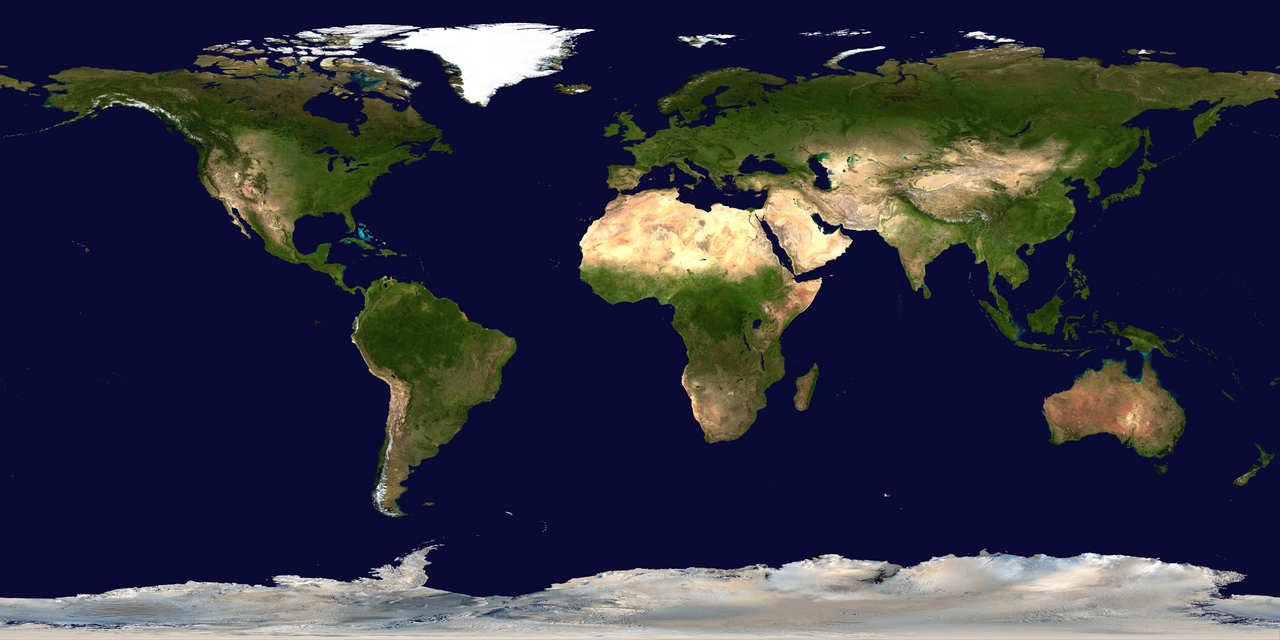
image "assets/hero.png" {
  alt   = "Our team at the launch"
  width = 480.0
  class = ["hero"]
}
That emits one element, with the block's own class on it and yours after it:
<img class="wdoc-image hero" src="_wdoc/image-hero-8572175c.png"
     alt="Our team at the launch" width="480" />
class adds names beside the built-in wdoc-image for your own rules to hook onto. Styling rules covers where those rules go. id sets an explicit HTML id, so a link elsewhere in the document can point at the picture.
The copied filename
The src above is not the name you wrote. The build renames a copied image to image-<stem>-<hash>.<ext>. The stem is the source's basename without its extension, with every non-alphanumeric character flattened to a dash and the result capped at 24 characters. The hash is eight hex digits computed from the whole source string, path and all.
Both halves earn their place. The stem keeps the folder readable when you go digging. The hash keeps two files named logo.png in two different folders from overwriting each other. Because the hash comes from the path and not from the bytes, the same source always produces the same output name. A rebuild does not churn the filenames, so a cache or a diff over the output folder stays quiet.
The build registers one source once no matter how many pages reference it, and copies it once.
Alt text
alt is the text a screen reader announces and the text a browser shows when the picture cannot load. It is optional in the schema and it should not be optional in your writing.
Two rules cover almost every case. If the picture carries information the surrounding prose does not, alt says what that information is, not what the picture looks like. If the picture is decoration, and the page reads correctly with it removed, write alt = "". An empty alt tells a screen reader to skip the element. Skipping is exactly right for decoration, and it is not the same as omitting the field.
Omitted is not empty
Leave alt out and the <img> carries no alt attribute at all. A screen reader falls back to announcing the filename, the generated image-hero-8572175c.png. That name is noise for a decorative picture and useless for an informative one. Write the text, or write alt = "" on purpose.
Sizing
width and height are floats and both are optional. What they mean depends on which of the two roles the block is in.
On a page they become the width and height attributes of the <img>, in pixels. Omit them and the browser uses the file's intrinsic size. The block also ships one style rule of its own:
img.wdoc-image { max-width: 100%; height: auto; }
So a page image never overflows its column, and its rendered height follows from its rendered width. Give width the size you want and leave height alone unless you need to reserve layout space before the file loads.
Inside a diagram the same two fields are user units on the drawing surface, and there is a third: scale multiplies whatever size the box ends up with. Omit width and height there and wdoc reads the file's own pixel dimensions out of its header. That is a real read of a real file, and it can come up empty.
Three formats have readable headers
The natural-size read understands PNG, GIF and JPEG. An SVG, a WebP, a corrupt file or any external URL yields no dimensions at all. In a diagram that leaves the box at 0×0 and the image invisible, so the build warns rather than drawing nothing quietly. On a page nothing depends on the read and nothing warns. The browser sizes the picture itself, and an SVG is perfectly fine there.
The warning names the source, so you can go straight to the block:
$ wcl wdoc build main.wcl --out _site
warning: image "https://example.com/logo.svg": no intrinsic size available
(unreadable or unsupported header, or an external URL) — set `width`/`height`
or the diagram image renders invisible
wrote 1 page
Cropping is a different block
image places a whole file. It has no crop, no source rectangle and no sprite index. Every field on it is about where the picture goes and how big it is, never about which part of the file to show.
Cropping a region out of a larger file is what the sheet-backed blocks are for, and there are three:
| Block | Crops | Covered in |
|---|---|---|
| tilemap | A grid of indexed tiles out of one spritesheet | Tilemaps and maps |
| map | Tiles out of a spritesheet, laid out as a world map | Tilemaps and maps |
| dopesheet | A range of frames out of a sprite strip, played at a set fps | Timelines and dopesheets |
All three are placeable diagram shapes, like image is, and all three take the same kind of source. The path rules and the served-not-opened rule above therefore apply to them unchanged. If you want a fixed crop of a picture and none of those fit, crop the file before the build. wdoc does not decode images beyond reading their headers.
Inside a diagram
image extends the diagram shape interface, so it is a legal child of any diagram or container and takes the shape vocabulary: x / y to place it, the anchor insets to pin it to a parent edge, and connect_points so a connection can attach to it. Live:
diagram {
  width = 300  height = 140

  image "assets/hero.png" {
    x = 20.0  y = 25.0  width = 120.0  height = 90.0
  }

  rect { x = 160.0  y = 45.0  width = 110.0  height = 50.0  fill = "#a3be8c" }
}
The emitted shape is an SVG <image> at that box, and the diagram's viewBox grows to fit it as it does for any other shape. The diagram canvas covers placement, anchors and sizing in full. Connections and routing covers attaching edges.
Aspect ratio is not preserved in a diagram
A diagram image is emitted with preserveAspectRatio="none", so it stretches to exactly the box you gave it. That is deliberate, because a shape occupies the rectangle you place it in. But a width / height pair that does not match the file's proportions distorts the picture. On a page the opposite holds. The shipped height: auto rule keeps the proportions for you.
video
video embeds a clip on a page. Unlike image it is page-only. It is not a diagram shape, and you cannot place it inside one.
The click-to-play facade
Three embedded videos on one page could open three connections and pull several megabytes before the reader has asked for anything. video does not do that. It first renders a facade, a poster thumbnail with a play button drawn over it. The small bundled player swaps in the real <video> or <iframe> only when the reader clicks. Nothing loads until someone wants it.
Click the poster below. It is a live local-file render: a short Big Buck Bunny excerpt, © Blender Foundation, CC-BY.
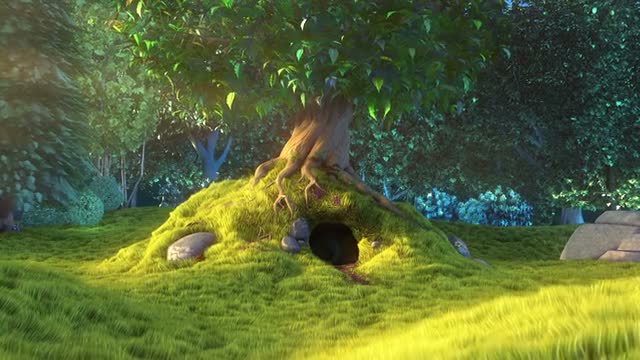
video "assets/intro.mp4" {
  poster = "assets/intro-thumb.jpg"
  title  = "Product intro"
  width  = 420.0
}
title is the accessible label: it becomes the facade's aria-label, the poster's alt, and the link text this block degrades to on every target that cannot play anything. Write one.
width and height are pixels, applied as an inline style to the facade so the swapped-in player inherits the same box. Omit both and the facade is responsive, with the player at a 16:9 aspect ratio inside it.
Four kinds of source
The build classifies the source string once, and the classification decides what the player becomes. There are four players and five shapes of source, because a URL that points straight at a video file uses the same native player a local file does:
| Source | Recognised as | Plays as |
|---|---|---|
| A doc-relative path | A local file | A <video> element, from the copy in _wdoc/ |
| A YouTube URL | The video id, from any of the usual URL shapes | A youtube.com/embed/<id> <iframe>, autoplaying on click |
| A Vimeo URL | The numeric video id | A player.vimeo.com <iframe>, autoplaying on click |
| Any other http(s) URL ending .mp4 / .webm / .ogg / .ogv / .mov / .m4v | A direct video file | A <video> element, straight from that URL. External, so never copied |
| Any other http(s) URL | A generic embed | An <iframe> on that URL, verbatim |
The YouTube shapes it understands are watch?v=ID, youtu.be/ID, /embed/ID, /shorts/ID and /v/ID, on youtube.com, m.youtube.com, youtu.be or youtube-nocookie.com, with or without www. and with any extra query parameters. Paste the URL from the address bar and wdoc recognises it.
The player hands the source to a <video> or an <iframe>, so the build checks its scheme first. A source may be a path, an http(s) URL, or a data:video/ URI. Anything else, a javascript: URL or a data:text/html page, renders no video at all and prints a warning:. A poster gets the same check with data:image/ in place of data:video/, and a poster that fails it falls through to the next step below.
video "https://www.youtube.com/watch?v=aqz-KE-bpKQ" { title = "Trailer" }
video "https://vimeo.com/76979871"                  { title = "Our talk" }
video "https://example.com/player/embed/abc"        { title = "Hosted clip" }
video "https://cdn.example.com/clip.webm"           { title = "Direct file" }
Posters
The poster is what the reader sees before they click. wdoc resolves it in three steps, and the first match wins:
- An explicit poster. Any source the label slot accepts, either a doc-relative path or an external URL. A doc-relative poster is copied, like the video.
- A YouTube auto-thumbnail. For a YouTube source with no poster, wdoc derives the thumbnail from the video id. You need no local file.
- A plain placeholder. A styled empty box with the play button on it.
The live YouTube facade below sets no poster, so the thumbnail comes from step two:

Always give a local video a poster
wdoc never decodes a video file, so it cannot pull a frame out of one to make a thumbnail. A local video with no poster shows the plain placeholder in HTML and prints as a bare italic line in PDF. The same poster does three jobs: the HTML facade, the PDF still, and the fallback link text's companion. That is one field's worth of effort for the whole set of targets. A YouTube embed is the one case that can skip it.
file
file is the general case behind the other two. It ships a file, of any kind, into the build output. Nothing is interpreted, nothing is decoded, nothing is renamed.
Ship it, and optionally link it
One field decides which of the block's two jobs you get. Set as and the block renders a link to the copy, with that string as the link text. Leave as out and the block renders nothing at all. The build still copies the file, and you reference it yourself at a path you can predict.
# Renders: <a class="wdoc-file" href="scripts/setup.sh">run setup</a>
file "src/setup.sh" { dir = "scripts"  as = "run setup" }

# Renders nothing. `assets/logo.svg` is in the output all the same.
file "src/logo.svg" { dir = "assets" }
The silent form is the useful one more often than it looks. It is how you get a downloadable archive, a schema file, a script or a font into the output and then link to it from ordinary prose, from a template, or from your own CSS.
dir, and the output path
This is where file parts company with image and video. A copied file keeps its basename, under the subdirectory dir names:
file "src/setup.sh" { dir = "scripts" }   ->  <out>/scripts/setup.sh
file "notes.txt"    {}                    ->  <out>/_wdoc/notes.txt
No hash, no rewriting. The emitted path is the one you would have guessed, and that is the entire point. scripts/setup.sh is a path you can type into a code block, hand to a reader, or reference from a tool that has no idea wdoc exists. An absent dir routes the file to the shared _wdoc/ asset folder alongside the images.
Predictability has a price, and the build charges it up front:
$ wcl wdoc build main.wcl --out _site
two different files map to the output path 'scripts/run.sh'
('a/run.sh' and 'b/run.sh') — give them distinct names or `dir`s
Two different sources on one output path is a build error, not a silent overwrite. Rename one, or send it to a different dir. Referencing the *same* source twice is not a collision. Repeat references share one copy.
A worked layout
dir is what lets a build write a folder that a reader or a tool can navigate by convention. Give the scripts and the data files a home of their own, and the rest of the output keeps to _wdoc/:
import <wdoc.wcl>

site helper { title = "Helper" }

page overview {
  start = true
  h1 "Helper"
  file "src/setup.sh"    { dir = "scripts"  as = "run setup" }
  file "assets/logo.svg" { dir = "assets" }
  image "assets/hero.png" { alt = "The Earth" }
}

page usage {
  h1 "Usage"
  p "More."
}
$ wcl wdoc build main.wcl --out _md --type markdown
wrote 2 pages

$ find _md -type f | sort
_md/assets/logo.svg
_md/index.md
_md/overview.md
_md/scripts/setup.sh
_md/usage.md
_md/_wdoc/image-hero-8572175c.png
Note the last line. dir belongs to file alone. An image still lands in _wdoc/ under its generated name, on every target that copies at all. If you want a picture at a path you chose, ship it with file and reference it yourself.
No PDF
The build refuses a file on a page you build to PDF:
$ wcl wdoc build main.wcl --out handbook.pdf --type pdf
wcl::eval::user_error

  × error: `file` has no :pdf implementation (it is native
  │ on :html, :markdown); remove the block or waive it here with
  │ `@except(backends = [:pdf])`
   ╭─[main.wcl:8:3]
 7 │   h1 "Helper"
 8 │   file "src/setup.sh"    { dir = "scripts"  as = "run setup" }
   ·   ──────────────────────────────┬─────────────────────────────
   ·                                 ╰── error raised here
 9 │   file "assets/logo.svg" { dir = "assets" }
   ╰────
This is a stated non-goal, not an unfinished corner. A PDF is one self-contained document. There is no output folder beside it to copy a file into, so a rendered link would point at something that was never shipped. That is worse than no link at all. The block declares which targets it covers, and the build holds it to the declaration.
The fix is to say what you meant, per instance:
@except(backends = [:pdf])
file "src/setup.sh" { dir = "scripts"  as = "run setup" }
Capability says *cannot*. @except says *do not want to*. The build refuses until the two agree. See Visibility for the backend axis and the rest of the decorator, and Writing your own blocks for what makes a block native to a target in the first place.
One page, three targets
Here is the whole chapter as one project you can type out. Three files beside a main.wcl:
media/
  main.wcl
  assets/
    hero.png
    intro.mp4
    intro-thumb.jpg
  src/
    setup.sh
import <wdoc.wcl>

site handbook {
  default_template = :webpage
  title            = "Handbook"
}

page index {
  start = true
  title = "Media"

  h1 "Media"

  image "assets/hero.png" {
    alt   = "The team at work"
    width = 480.0
  }

  video "assets/intro.mp4" {
    poster = "assets/intro-thumb.jpg"
    title  = "Product intro"
    width  = 480.0
  }

  file "src/setup.sh" { as = "setup.sh" }
}
Build it to HTML and look at what landed:
$ wcl wdoc build main.wcl --out _site
wrote 1 page

$ find _site -type f | grep -v woff2
_site/index.html
_site/_wdoc/favicon.svg
_site/_wdoc/image-hero-8572175c.png
_site/_wdoc/pages.json
_site/_wdoc/poster-intro-thumb-5b050ec9.jpg
_site/_wdoc/setup.sh
_site/_wdoc/video-intro-e1bb5f9c.mp4
_site/_wdoc/wdoc-video.js
Four assets, three naming schemes doing one job each. The image and the video carry a stem and a hash. The poster is a second registered asset with its own poster- prefix, because a thumbnail is a file in its own right. setup.sh kept its name, because file promised it would. And wdoc-video.js is there because the page rendered a video. The click-to-play player ships only when something needs it.
The three blocks in the page body:
<img class="wdoc-image" src="_wdoc/image-hero-8572175c.png"
     alt="The team at work" width="480" />

<div class="wdoc-video" data-kind="local" data-src="_wdoc/video-intro-e1bb5f9c.mp4"
     aria-label="Product intro" style="width:480px;">
  <img src="_wdoc/poster-intro-thumb-5b050ec9.jpg" alt="Product intro" />
  <span class="wdoc-video-play" aria-hidden="true"></span>
</div>

<a class="wdoc-file" href="_wdoc/setup.sh">setup.sh</a>
data-kind and data-src are how the facade tells the player what to build and where to point it. Until a click happens there is no <video> element on the page at all.
Now the same source as Markdown. The blocks are the same, and only the readings differ:
$ wcl wdoc build main.wcl --out _md --type markdown
wrote 1 page
$ find _md -type f
_md/index.md
_md/_wdoc/image-hero-8572175c.png
_md/_wdoc/setup.sh
_md/_wdoc/video-intro-e1bb5f9c.mp4
$ cat _md/index.md
# Media

[Product intro](_wdoc/video-intro-e1bb5f9c.mp4)
[setup.sh](_wdoc/setup.sh)
Three things to read out of that. The image is a Markdown image, alt text and all. Static Markdown cannot play anything, so the video degrades to a link to the copied file, labelled with its title. That is why title was worth writing. And the poster is gone. With no facade to render, nothing referenced it, so nothing copied it. A registry ships only what something asked for.
The PDF build is the one that stops, on the file:
$ wcl wdoc build main.wcl --out handbook.pdf --type pdf
wcl::eval::user_error

  × error: `file` has no :pdf implementation …

$ wcl wdoc build main.wcl --out handbook.pdf --type pdf     # after adding @except(backends = [:pdf]) to the file
wrote 1 pdf
That is the coverage refusal from No PDF, met in a real build. Waive the file and the PDF renders. The image is embedded in it rather than referenced. A PDF is one self-contained document, so the raster bytes go inside. The video has nothing to play, so it prints its poster. An online video would print a link beneath the poster, and a local one prints the poster alone, because a path to a file on your machine is useless in a document you hand to somebody.
When the file is not there
A missing local source is a build error, on the copy:
$ wcl wdoc build main.wcl --out _site
copy assets/nope.png -> _site/_wdoc/image-nope-b0f360e4.png:
No such file or directory (os error 2)
Read the two paths in that error. The one on the left is where wdoc looked: the source you wrote, resolved against the entry's folder. The one on the right is where it was going. When the left-hand path is not the file you meant, the base folder is what to check first.
A PDF build is the exception, because it never copies. A missing image there is a warning that names the absolute path it tried, and the picture stays out of the document. No target checks a URL. Nothing is fetched at build time, so a dead URL is only ever a dead URL in the reader's browser. In a PDF it is worse than dead. The build leaves an http(s) or data: image out of the document altogether, since there is no network to fetch it from and no folder to reference. A site-root source such as "/logo.png" is the odd one out there. The PDF build takes it as an absolute filesystem path and tries to read it, and warns with cannot read /logo.png when nothing is there.
The three blocks side by side
This is the comparison the rest of the chapter has been building toward. Reach for the row, not the block.
| image | video | file | |
|---|---|---|---|
| Where it may go | A page, or a diagram | A page | A page |
| Renders by itself | Always | Always | Only with as |
| Output path | _wdoc/image-<stem>-<hash>.<ext> | _wdoc/video-<stem>-<hash>.<ext> | <dir>/<basename>, unchanged |
| You can predict the path | No | No | Yes. That is the point |
| Inspects the file's contents | Its header, for the natural size | Never | Never |
| HTML | <img> | Click-to-play facade | A link, or silence |
| Markdown |  | A link to the file or the URL | A link, or silence |
| Embedded, local sources only | Poster, plus a link when online | Refused. Waive with @except |
Three questions settle almost every choice between them. Does the reader need to see it on the page, or to get hold of the file? Does the path have to be one you can write down? And is a PDF one of your targets?
Where to go next
- Output targets. The three builds, what each emits, and why a block may cover only some of them.
- Visibility. @only / @except, the backend axis, and per-instance waivers.
- The diagram canvas. Placement, anchors and sizing for image in its shape role.
- Tilemaps and maps. Cropping tiles out of a spritesheet.
- Timelines and dopesheets. Cropping and playing a strip of frames.
- Icons. The other asset family, drawn from bundled packs rather than your own files.
- Writing your own blocks. Lowering, native blocks, and declared backend coverage.